
PRAE assistant
What the PRAE assistant does
PRAE (pauschale Reiseaufwandsentschädigung) is the Austrian flat-rate travel allowance in sport. A non-profit sports club may pay it free of tax and social insurance contributions up to 120 euros per day of activity and 720 euros per calendar month. The PRAE assistant records the days per person and month and produces the Sport Austria form, the declaration of secondary occupation and the year overview, which is the basis for the annual report L19 to Finanzamt Österreich, filed through ELDA, the data portal of the Austrian social insurance.
The app is meant for treasurers and chairpersons of small clubs who do the paperwork themselves. One or two people work with it, not at the same time. Each club is its own file on your computer; when the treasurer changes, the file goes with the office.
The PRAE assistant is neither payroll software nor legal advice. It checks the limits and the formalities of the PRAE, no more. Where a person is employed by the club, where another country is involved, or where a person is retired, ask your tax adviser; the app does not decide such cases.
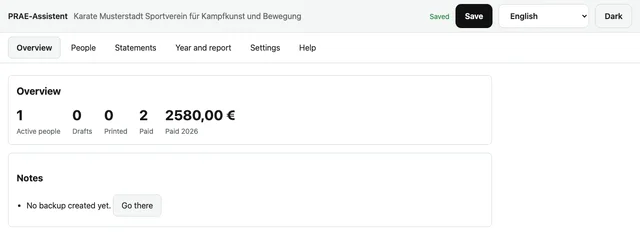
Step by step through the year
- Create the club: name as in the register, ZVR number and, if there is one, the tax number. The ZVR number needs ten digits; if yours has nine, the app adds the leading zero, as ELDA requires. Enter the address and the default amount per day of activity at the same time.
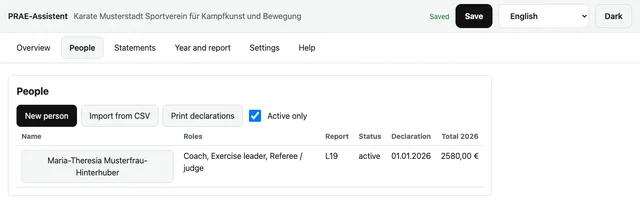
- Enter the details for each person: name, date of birth, social security number, address and IBAN, plus the roles and the report type. Then print the declaration of secondary occupation, have it signed and record the date of the signature with the person. Without that date the app flags every statement.
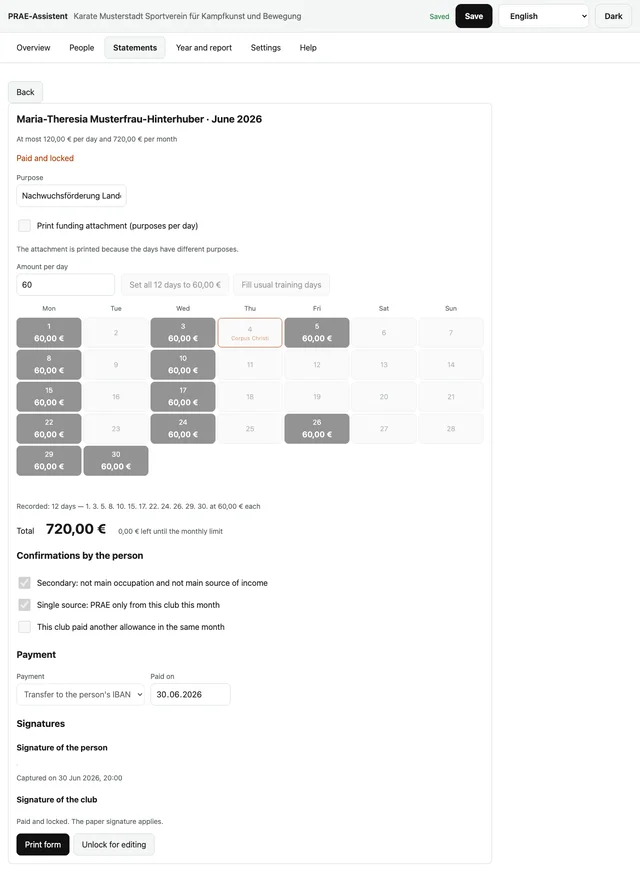
- Do the month: choose person and month, check the amount per day above the calendar, then click the days of activity. If usual training days are recorded for the person, one click fills the whole month. One button sets all recorded days to the amount in the field; a second click on a day opens it for changing or removing. The app refuses more than the 120 euros a day or 720 euros a month that apply since 2023.
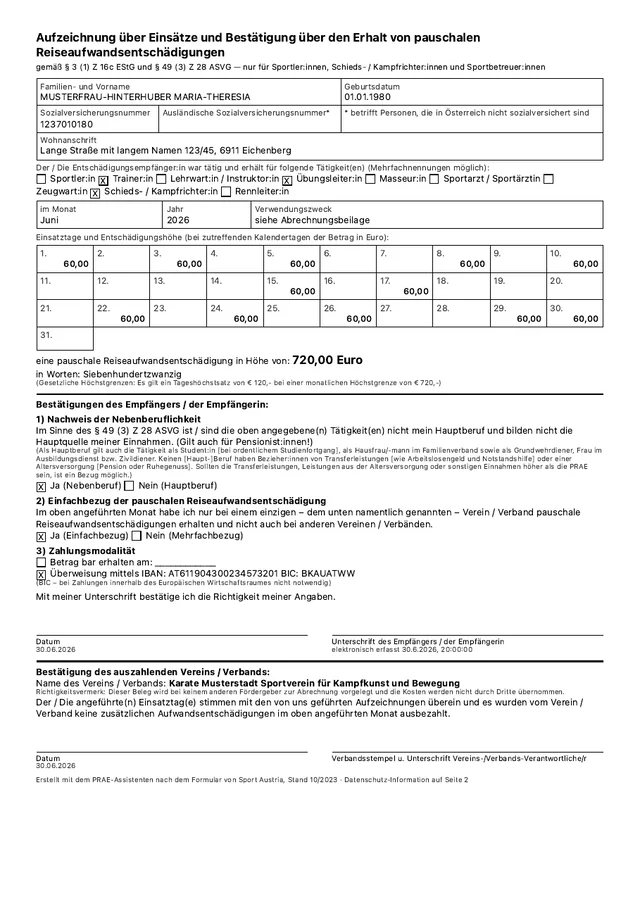
- Print the form "Aufzeichnung über Einsätze". The person signs for the receipt, the club confirms that the entries are correct; that makes two signatures on the same sheet. Printing sets the statement to the status Printed.
- Pay out, enter the date of payment and choose "Mark as paid". The statement is then locked, so that the printed sheet and the file cannot drift apart. To change it, unlock it and print again.
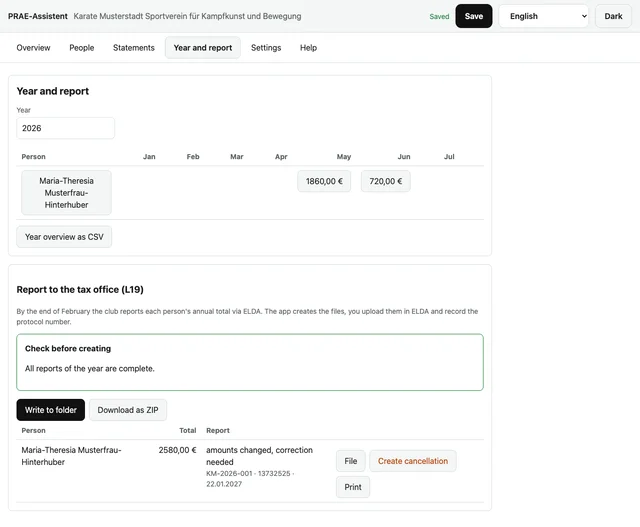
- In January: open "Year and report" and check the year table. Finish the open months, because only statements marked as paid count towards the annual total. The notes beside the table show where a declaration, a signature or a status is missing.
- By the end of February you report each person's annual total on form L19 through ELDA, not through FinanzOnline. For this the club registers once with ELDA using the personal ID Austria of an office holder. In the "Year and report" area the app checks the entries against ELDA's rules and creates one XML file per person, in a folder or a ZIP file. In ELDA you choose "Daten senden" and upload them; you then record the protocol number, and it counts as submitted. If an amount changes, the app creates a correction with the same reference number; a cancellation is only needed if the ZVR or the year were wrong. The file copy is printed with "Print".
The rules in brief
Only a non-profit club or federation whose statutory purpose is the practice or promotion of sport may pay PRAE. A karate club qualifies. Non-profit status is a condition, not a formality: if it falls away, the tax exemption of the PRAE falls with it. (BMF guide to the sports-people exemption, 2023)
Athletes, referees and judges as well as sports support staff may receive it: coaches, instructors, exercise leaders, masseurs, sports physicians, equipment managers, race directors and timekeepers. Office holders such as the chairperson and the treasurer, groundskeepers, marshals, driving services and general helpers are excluded. Membership of the club or a qualification is not required; someone holding both roles, chairperson and coach, receives PRAE only for the coaching. (PRAE FAQ agreed with BMF and ÖGK, Sport Austria 2023)
The activity must be neither the main occupation nor the main source of income. The main occupation is the one that takes most of the time; studying with regular progress and running the household in the family count as an occupation, while a pension, unemployment benefit and hardship benefit do not. Only if the sporting activity is the main occupation, as it can be for pensioners, is it also checked whether the other income including the pension exceeds the PRAE. (PRAE FAQ agreed with BMF and ÖGK, Sport Austria 2023)
A day of activity is a day on which sport actually takes place for the club: training, competition or a course with active physical exercise. The length of the day does not matter, and there is no upper limit on the number of days. A day in the office, a meeting or a journey without training is not a day of activity. (BMF guide to the sports-people exemption, 2023)
Since 2023 up to 120 euros per day of activity and 720 euros per calendar month are free of tax and social insurance contributions; before that the figures were 60 and 540 euros. No employer levies arise. Anything above the limits is taxable and, where there is an employment relationship, liable to contributions as well: the club then needs payroll records and registers the person with the ÖGK before work starts. (BMF guide to the sports-people exemption, 2023)
A constant monthly amount without days of activity is a fixed fee and fully liable to tax and contributions; equal amounts are only allowed where the days of activity carry them. The PRAE must not be carved out of an agreed salary. Mileage and daily allowances in cash cannot be paid alongside it by the same club; benefits in kind such as a coach trip, a train ticket or accommodation are allowed. Prize money is remuneration and therefore liable to tax and contributions, even when it is paid next to the PRAE. (BMF guide to the sports-people exemption, 2023)
A person may receive PRAE from several clubs, and each club may treat it as exempt up to the limit; the reduction to a single maximum happens in the tax return of the person. The club still needs to know whether there is one source or several, because the person confirms it on the form. PRAE and the volunteer allowance from the same club exclude each other; from 2026 the exclusion applies month by month instead of year by year, and the annual maximum of the volunteer allowance is reduced by one twelfth for each PRAE month. (PRAE FAQ agreed with BMF and ÖGK, 2023; BDO on the tax amendment act 2025)
The PRAE belongs to the month of the days of activity, not to the month of payment. Training in June, payment in July: the statement is the one for June. The 720 euro limit and the year of the L19 report both depend on this. (BMF guide to the sports-people exemption, 2023)
The notices of the app
| Notice | What the app found | What to do |
|---|---|---|
| G1 | A day of activity is entered with more than 120 euros. | Enter 120 euros at most; paying more means settling the excess through payroll. |
| G2 | The month adds up to more than 720 euros. | Reduce the amounts, or enter days of activity in the month in which they actually took place. |
| G3 | A day of activity has no amount, or an amount of zero. | Enter an amount above zero, or remove the day. |
| G4 | A day of activity lies outside the month of the statement. | Create the statement for the right month; the PRAE belongs to the month of the days of activity. |
| G5 | Two days of activity have the same date. | Merge the two entries into one day with one amount. |
| W1 | No signed declaration is recorded for the person, or it is more than three years old. This is a recommendation, not a requirement: the declaration protects the club, while the person confirms the secondary occupation on the form every month. Payment remains possible. | Print the declaration, have it signed and record the date with the person. |
| W2 | The person has stated that the activity is their main occupation. | Clarify the case before paying; without a secondary occupation the PRAE is not exempt. |
| W3 | The person also receives PRAE from other clubs in the same month. | Nothing further; this club may stay exempt up to the limit, the person settles the rest in their tax return. |
| W4 | The club paid another flat-rate allowance to the same person in the same month. | Choose one of the two payments; PRAE and the volunteer allowance exclude each other in the same month. |
| W5 | The person has report type L16, or no report at all. | No L19 is created for them; the amounts go through payroll, or into no report at all. |
| W6 | Every month of the year has the same amount and the same number of days of activity. | Check the records; equal amounts are only allowed where the days of activity carry them. |
| W7 | The person has no social security number, and the date of birth or the address is missing. | Add the date of birth and the full address; without the number the report needs both. |
| W8 | A statement is still a draft or only printed after 31 January of the following year. | Finish it and mark it as paid before you report the annual total. |
| W9 | The L19 report for a finished year is missing. | Report the annual totals through ELDA by the end of February; from 1 February the app highlights the notice. |
Where the data lives
Each club is its own file on your computer, for example "PRAE Karate Bregenz.json". It holds the club details, every person with social security number, address and IBAN, every monthly statement and later the annual reports. There is no cloud, no account and no server; nothing is transmitted.
Chrome and Edge write to that file themselves after every change. After a restart of the browser the permission is reset; one click on "Grant file access again" and you continue. Your data is untouched in the meantime.
Safari and Firefox cannot write to files themselves. There you open the file at the start and save it with the button at the top right as a download. Do not rely on browser storage: Safari clears it after seven days without a visit, and only what is in the file is safe.
If you keep two clubs on one computer, each has its own file. The start screen lists the recently opened clubs with their file names, and the header shows the name of the open club. Check the file name before you enter anything, so that the figures of one club do not end up in the file of the other.
With "Create backup" you write a second file carrying the club name and the date in its name; "Restore backup" reads it back and asks first what will be replaced. Keep the backup in a folder only authorised people can see, and do not send it by mail: it contains social security numbers, dates of birth and IBANs in plain text.
Signatures
The usual way is paper: you print the form, the person signs for the receipt, the club confirms that the entries are correct. The club keeps the signed sheet for seven years; a copy for the person is recommended.
On a tablet or with the mouse the form can also be signed on screen. That is a simple electronic signature, not a qualified one such as ID Austria. As a receipt towards the club it is usable; whether a funding body accepts it for a funding report is for the club to settle with that body. The app does not decide this.
Use paper when a funding report or an audit is coming and you do not know what will be required. Use the screen when the person is present and no printer is near; the image is printed on the signature line together with the date and time it was captured. Without an image the line stays empty and is signed by hand.
Data protection
The club file holds the name, date of birth, social security number, home address and IBAN of every person, all days of activity with their amounts and, where captured, the signature images. These are personal data that need particular care; backups contain them in plain text.
Only what a report requires leaves the club: the annual total per person with the social security number, or date of birth and address, to Finanzamt Österreich through ELDA. A funding body gets the statements it needs for the funding, a tax adviser what they need for the report. Nobody else; the file itself moves only when the office of treasurer is handed over.
The second page of the form is the data protection notice for the recipients; the app prints it along and you pass it on with the copy. The club keeps the records for seven years, after which they may be deleted.
Common mistakes
The same monthly amount without any record of days of activity. Auditors read that as a fixed fee; enter the days one by one and print the form with the calendar.
Paying office holders or helpers who are not sports support staff. There is no PRAE for the chairperson, the treasurer, the groundskeeper or a driving service; for them there are the club guidelines or the volunteer allowance.
Mileage or a daily allowance on top of the PRAE from the same club. Pay either the PRAE or the travel costs in cash; benefits in kind such as a train ticket remain possible alongside.
The statement ends up in the month of payment instead of the month of the days of activity. That breaks the 720 euro limit or puts the report in the wrong year; always create the statement for the month in which the training took place.
The declaration of secondary occupation is missing or out of date, for instance after retirement or a spell of unemployment. Have it signed before the first payment and again after any change; the app flags it as long as no date is recorded.
The L19 is forgotten, filed too late or carries a wrong social security number. The deadline is the end of February of the following year, and a breach is a fiscal offence carrying up to 5,000 euros; the app checks the number as you type it.
The ZVR number is submitted with nine digits and ELDA rejects the report. ELDA requires ten digits; the app adds the leading zero.
Totals are typed into the annual report by hand, and the monthly statements and the report drift apart. Take the annual total from "Year and report"; it is the sum of the statements marked as paid.
A correction is given a new reference number and two reports are active at the same time. A correction and a cancellation use the same reference number; the L19 submitted last is the valid one.
Signatures are missing, or the papers cannot be found a few years later. Have every form signed by both sides and file it for seven years, together with the ELDA receipts.
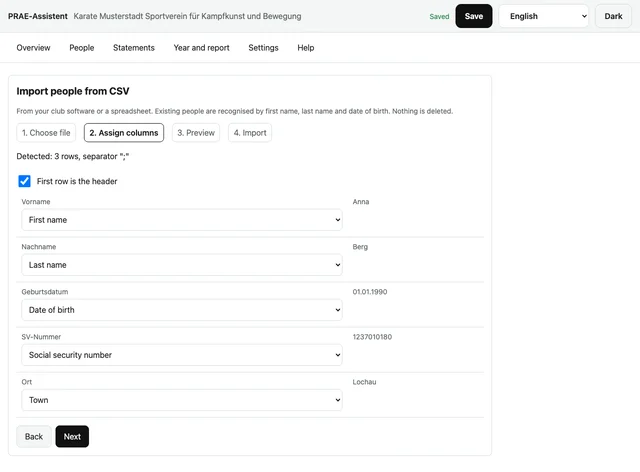
People are typed in by hand from the club software; that produces transposed digits or a second entry for the same person. Use "Import from CSV" in the list of people: choose the file, assign the columns, look at the preview, import. The app recognises existing people by first name and last name, and by the date of birth as well when both sides have one. You choose whether existing people are completed (empty fields only), overwritten or skipped; nothing is deleted. Rows without a first or last name are left out and are listed in the report at the end.
Every statement is printed on its own, and at the end a declaration is missing. In the month list "Print all" prints the form, the data protection page and, where needed, the annex for each person in one go; statements with errors are left out and the app names them. In the list of people "Print declarations" prints the declaration for every active person without a date of signature. For the tax adviser and for funding reports, "Year overview as CSV" in the "Year and report" area writes the monthly amounts, the annual total and the state of the report as a table.
What the app does not do
The PRAE assistant keeps no payroll records and produces no L16. Anyone paying more than 120 or 720 euros, paying bonuses or settling with a person employed by the club needs payroll software and, where applicable, registration with the ÖGK. The app does not handle the volunteer allowance; it only remembers whether another allowance was paid in the same month, and warns.
For funding the app prints the statements and the annex on the purposes of the payments; the funding report itself is not its job. It shows no totals across several clubs, because each club is its own file and settles for itself; the limit across clubs is settled by the person in their own tax return.
The app uploads nothing to ELDA. It creates the files; the upload you do yourself in ELDA Online, and only the protocol number from there proves the submission. Country codes are checked only for two capital letters; ELDA checks them against its table of countries. The paper form L19 is only the exception for clubs without access to ELDA, and on paper the earlier deadline of the end of January of the following year applies; the normal way is the electronic report.
About this app
You are using the PRAE assistant, version 1.0, build 2026-09-25. The app is published under the MIT licence; the licence text is further down in this help.
The PRAE assistant comes from hajime.at and lives there. Feedback, faults and wishes go to the address on hajime.at. If a notice of the app is wrong or a rule is missing, it is worth reporting.
Sources
- BMF guide to the sports-people exemption, 2nd edition, October 2023
- PRAE FAQ, agreed with BMF and ÖGK (Sport Austria 2023)
- Sport Austria form "Aufzeichnung über Einsätze", version 10/2023
- BMF, form L19
- ELDA, general description of the L19 data transfer
- SPORTUNION, guide to the digital PRAE report, 2025
Licence text (MIT), original wording
MIT License

Copyright (c) 2026 Stefan Mayr

Permission is hereby granted, free of charge, to any person obtaining a copy
of this software and associated documentation files (the "Software"), to deal
in the Software without restriction, including without limitation the rights
to use, copy, modify, merge, publish, distribute, sublicense, and/or sell
copies of the Software, and to permit persons to whom the Software is
furnished to do so, subject to the following conditions:

The above copyright notice and this permission notice shall be included in all
copies or substantial portions of the Software.

THE SOFTWARE IS PROVIDED "AS IS", WITHOUT WARRANTY OF ANY KIND, EXPRESS OR
IMPLIED, INCLUDING BUT NOT LIMITED TO THE WARRANTIES OF MERCHANTABILITY,
FITNESS FOR A PARTICULAR PURPOSE AND NONINFRINGEMENT. IN NO EVENT SHALL THE
AUTHORS OR COPYRIGHT HOLDERS BE LIABLE FOR ANY CLAIM, DAMAGES OR OTHER
LIABILITY, WHETHER IN AN ACTION OF CONTRACT, TORT OR OTHERWISE, ARISING FROM,
OUT OF OR IN CONNECTION WITH THE SOFTWARE OR THE USE OR OTHER DEALINGS IN THE
SOFTWARE.